Saturday, June 6, 2015

Solution for ACM-ICPC world finals 2015 Problem B : Asteroids

So, as promised I am back with the another installment of solution which is for  ACM-ICPC world finals 2015 Problem B : Asteroids. This is done in the so-called Object Oriented manner. Unfortunately it does not converge with the requirement of answer as per input sample set 1 i.e. 4.19358 instead, it gives 4.17699. We've calculated Centroid, Area, Apothem, Side and so on. To detect the maximum overlapped area we have considered the distance between the centroids of these polygons. The code may be found at the github link.

Wednesday, May 27, 2015

Solution for ACM-ICPC world finals 2015 Problem A : Amalgamated Artichokes

Upon recent completion of ACM-ICPC world finals 2015, an interesting result of participating institutes is available at: http://icpc.baylor.edu/worldfinals/results. A list of problems is available at: http://icpc.baylor.edu/worldfinals/problems/icpc2015.pdf.

The challenge requires the solution in C, C++ or JAVA I thought to give a try to the one of my personal favourite i.e. Python. I shall try to put solutions on this blog. So here comes solution to Problem A : Amalgamated Artichokes


Saturday, January 4, 2014

Using Arduino Analog Pins to Interact with LCD

Following the arduino tutorial, http://arduino.cc/en/Tutorial/AnalogInputPins it was quite clear that the Analog Pins can be used as its Digital counterpart. Except with a little different way of identification, i.e. prefixing the respective Analog pin with the character 'A' (A for Analog). 

The significance of this feature was overlooked until recently I desperately needed numerous digital pins, and I ran out of them on my Arduino (Atmega328) clone to drive Hitachi HD44780 compatible LCD. 

People suggested to use shift registers or I2C backpack etc., though, I wanted something more simpler and ultimately following the below mentioned tweaking, I got the LCD up and running using Analog pins. No rocket science, but felt happy, as I had saved my pocket from the extra expenses!!!

Display
Original
Our Experiment
RS
12
A0
RW
GND
GND
EN
11
A1
D4
5
A2
D5
4
A3
D6
3
A4
D7
2
A5

At the same time the code needs to be slightly changed, shown as below.

// Replace LiquidCrystal lcd(12, 11, 5, 4, 3, 2); with
LiquidCrystal lcd(A0, A1, A2, A3, A4, A5);

This shall use all Analog pins, though, the user is spared with all digital pins free, if the it is the sketch's demand .

Sunday, February 12, 2012

A Dream Undergrad Computing Institute

At last we had weekend that we termed as a creative one. The reader may find it even crazy on reading this blog-post further! Me and @Devji were thinking about a dream institute offering an undergraduate program in Computing.

We imagined one of those all time great people teaching a course of their respective specialisation in this institute. Later on Sunday i.e. today was spent in crunching for more people in this institute. Check the below mentioned image out and comment for modifications if any.

Sr.

Position

Position Held By

1.

Principal Director

Prof. Edsger Wybe Dijkstra

2.

Research Director

(Software Projects)

Prof. Andrew S. Tanenbaum

3.

Research Director

(Hardware Projects)

Mr. Steve Wozniak

4.

Laboratory Coordinator

Prof. Ken Thompson

5.

Laboratory Assistant

Mr. Linus Torvalds/

Mr. Bram Cohen

Sr.

Course

Taught By

1.

Mathematics

Prof. Srinivas Ramanujan

2.

Technical Communication for Computing Science

Prof. Donald E. Knuth/ Prof. Tim Berners-Lee

3.

Computer Architecture

Prof. John von Neumann/

Prof. Seymour Cray

4.

Theory of Computing

Prof. Alan Turing

5.

Algorithms

Prof. Ronald Rivest

6.

Operating Systems

Prof. Denis Ritchie/

Prof. Rob Pike

7.

Compiler Design

Prof. Brian Kernighan/

Prof. James Gosling

8.

Object Oriented Programming

Prof. Bjarne Stroustrup

9.

Computer Networks

Prof. Leonard Kleinrock

10.

Database Systems

Prof. Edgar F. Codd

11.

Artificial Intelligence

Prof. John McCarthy

Friday, October 21, 2011

Missing dmr!!

(Dennis MacAlistair Ritchie)

dmr - Dennis MacAlistair Ritchie silently left this world on October 12, 2011. Internet fraternity came to know about this sad news through Rob Pike's google+ status. Though, people were still overwhelmed by the Steve-mourning phenomena on different social networking sites. dmr has left a strong and unavoidable legacy of UNIX and C. We will really miss you Dennis for all these, you were, are and will be counted as one of the fathers of computing! Rest In Peace dmr.


Thursday, October 6, 2011

Nostalgic Devices!

After more than two and a half years, very abruptly I am back to the Blogger dashboard. The Dussera holiday began with the hot saffron flavored Jalebies however, there were a sad news of the demise of Steve Jobs.

Coincidentally, these days I am reading iWoz by Steve Wozniak and Gina Smith a late-birthday gift by a student turned friend turned colleague Prof. Devji Chhanga.

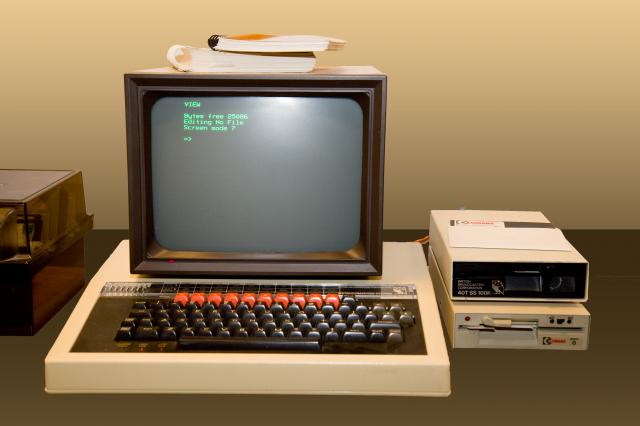
This text reminded me of my memories of the past. I try to enlist those devices, which I have had a chance ever to work with.

CASIO FX 795P


CASIO FX 880P

BBC Micro


AMD 100 MGHz DX/4

So beautiful were those days! I thank my dad and my historic high school Alfred High School for allowing me the access to all these and I also thank the image-sources for the post.

Monday, June 15, 2009

The Grid Approach Towards Fighting Swine Flu

It has been unanimously agreed that Computational Grids are proven tool for complex and resource consuming computational challenges. It is evident that these challenges need not to be a routine laboratory experiment always.

Today's one of the similar challenge for the human race is to fight against the pandemic Swine Flue or Influenza H1N1. An adorable initiative has been started to delegate and utilize the idle computational cycles of voluntary contributor computers to find the best matching chemical compounds to fight against the virus.

For more information the visitor is requested to visit http://www.worldcommunitygrid.org/projects_showcase/flu1/viewFlu1Main.do . Even you can contribute in this and other projects that are helpful for the entire human race, just by downloading a small program and voluntarily contributing the idle computational cycles of your computer from http://www.worldcommunitygrid.org/reg/viewRegister.do .

Wednesday, May 6, 2009

List of Globus 4.2.1 Commandline Tools

A very handy list of Globus Toolkit (GT) 4.2.1 Commandline tools can be downloaded in PDF format from http://www.globus.org/toolkit/docs/4.2/4.2.1/commands/gtCommands.pdf with due thanks to http://www.globus.org.

Saturday, November 8, 2008

Connecting A USB Mobile with AIRTEL GPRS connection to Internet in Linux

Though the newer versions of Linux come with a GUI configuration utility (A NetworkManagerApplet) to configure a USB compatible phone to connect to the Internet still, in many contemporary as well as older versions do not have a graphical utility. So, in this post we try to tweak a USB phone by connecting it to the Internet. The Major part of this how-to is inspired from Dave's Blog (http://davestechsupport.com/blog/2008/02/28/how-to-connect-linux-to-your-cellular-internet/) and some more tweaks are also made later on based on heuristics.

The steps to be followed are as under:

1. edit /etc/wvdial.conf in your favourite text editor and make these changes:

[Dialer Defaults]
Init1 = AT+CGDCONT=1,"IP","airtelgprs.com"
Modem Type = USB Modem
Phone = *99#
Password = pass
Username = user
Modem = /dev/ttyACM0
Baud = 460800

2. In the 2'nd line Init1 shows the initialization string for your phone. airtelgprs.com will be the acceess point of you are using Airtel GPRS. For other carriers kindly contact your Internet Service Providor. The second last option Modem is the USB device, which may be traced by supplying the command dmesg | grep "ACM"

3. issue the command # wvdial and note down the DNS addressses. Now just disconnect by pressing Ctrl + C or somthing similar.

4. now some extra tweakings, despite doing these changes I was unable to browse the Internet, and heuristic worked here:

edit the file /etc/resolv.conf and append it with obtained Name servers, something like this:

search xxx.yyy.ppp.qqq
nameserver xxx.yyy.ppp.qqq
nameserver xxx.yyy.ppp.abc

5. Now it is almost ready to surf, just open a console and issue command # wvdial

6. Open Firefox and go to File -> Uncheck on Work Offilne option.

Now it is ready to!

Wednesday, March 19, 2008

Google's Summer Double Bonanza Offer!!

Freinds, this time we are talking on something else and no linux, no PI, no supercomputing.
On March 19, 2008 around 5.20 pm IST, (GMT +5.5) the orkut server suddenly seemed to have started a double bonanza offer and the number of scaps and fans was doubled. However, this lasted for only 10 minutes and hats off to the google people as the problem was resolved !! Can't beleive?? See the following screenshots.

(Original)

(Double Bonanza!!)


Thursday, February 28, 2008

Install Linux from iso image without buring on CD

It's a very obvious practice to burn the downloaded iso images of linux (in general sense any operating systems) prior to the installation to an optical removable media (CD/DVD). However, for a change we will see how we can install a new linux distribution from an existing linux distribution and without making any copies of iso image of the operating system on a CD/DVD.

There are some pre-requisites for this task, which are as follow:
- A preinstalled linux distribution with superuser rights
- The GRUB bootloader- A Pre-downloaded Linux iso image (we will be installing zenwalk linux which can be downaloded from http://www.zenwalk.org/modules/tinycontent/index.php?id=1)
- Free disk space to install the new linux distribution from the iso image
Now folllow the below mentioned steps:
-> Start your existing linux distribution
-> Copy the zenwalk iso in your home folder say /root/home
-> Execute the following commands :
#su
#mkdir -v /mnt/zenwalk
#mount -o loop /root/home/zenwalk-x.x.iso /mnt/zenwalk
#mkdir -v /boot/zen_iso
#cp /mnt/zenwalk/isolinux/*.* /boot/zen_iso

-> Now fire up your favourite text editor, open /boot/grub/menu.lst for edititing and paste the following lines at the end:
title Install Zenwalk
root (hd0,x)
kernel /zen_iso/vmlinuz-2.6.xx.x root=/dev/hdax+1 ramdisk_size=100000 init=/etc/init lang=us fromhd=/dev/null bootfrom=/dev/hdax+1/root/home/zenwalk.x.x.iso
initrd /zen_iso/initrd.splash
-> Now save your work, you have edited your GRUB so that it will take you to the Zenwalk kernel
-> Reboot your system and select 'Install Zenwalk' option
-> This will start your Zenwalk kernel
-> Escape from installation menu
-> Mount your existing linux partition somewhere at /mnt/linux by the following command:
#mkdir -v /mylinux
#mount /dev/hdx+1 /mylinux

-> Mount the Zenwalk iso image from this partition as given below:
#mkdir -v /zw_install
#mount -o loop /mylinux/root/home/zenwalk-x.x.iso /zw_install
-> Restart the Zenwalk installation program by the following command
#setup
-> Follow the on screen instruction for partitioning etc.
-> Specify the 'other' location to be /zw_install
-> Proceed to the installtion process
This should install the Zenwalk without burning it to a DVD/CD!Note: To determine your linux partition you may use lvmdisscan grep "hda" command

Saturday, January 26, 2008

Easiest Way Finding PI

Once again we have decided to play with the mysterious ∏. However, this time rather than just merely talk about this mysterious figure we will be implementing a simple algorithm to find an approximate value of the same. The said method as follows:
  • Inscribe a circle in a square
  • Randomly generate points in the square
  • Determine the number of points in the square that are also in the circle
  • Let n be the number of points in the circle divided by the number of points in the square
  • PI ~ 4 n
  • Note that the more points generated, the better the approximation

A simple C program for the same may be downloaded from here:http://equinox-northeast.110mb.com/xus/pi.c

kindly send your feedbacks and bug reports on xitij1983@rediffmail.com

Sunday, December 23, 2007

Recover the Linux Boot Loader (Grub)

Most of the Linux users who are using multiple operating systems installations in a single hard drive. Many of them (Especially those of Microsoft's) have to encounter the erasure and re-writing of MBR (Master Boot Record) after re-installing or fresh installing Windows after Linux. This situation is very frustating as despite the Linux partition being intact, one has to reinstall the Linux distribution everytime after installation of Windows.
By issuing the below commands, one can retrieve his/her previous Grub Bootloader screen in 6 easy steps.
Prerequisites:
  • You need a bootable Linux CD (Preferably a live CD)
  • Please note that the Linux partiton for which you are going to recover the MBR should be installed on an un-encrypted filesystem
Stpes:
  • Boot with the bootable linux CD
  • Invoke the shell
  • Give the following commands
  • # grub (This will drop you on the grub prompt)
  • grub>geomettry (hd0) (Your Primary Hard Drive. Determine the Linux Partition number say "n")
  • grub>root (hd0,n) ("n" is your linux partition searched by the previous command)
  • grub>setup (hd0,n)/boot/grub/menu.lst
  • quit

Voila!!.... just restart your computer and find your previous MBR restored!!

Sunday, December 16, 2007

All new Top500 along with one at India in Top5

The latest Top500 list was rejuvinated with a never before 478.2 TFop/s delivered by as ususal much discussed the BlueGene/L System, (a joint development of IBM and the Department of Energy's (DOE) National Nuclear Security Administration (NNSA) and installed at DOE's Lawrence Livermore National Laboratory in Livermore, the United States) breaking its own record of 280.6 TFop/s. There were many new players seen sucha as for the first time ever, India placed a system in the Top 10. The Computational Research Laboratories, a wholly owned subsidiary of Tata Sons Ltd. in Pune, India, installed a Hewlett-Packard Cluster Platform 3000 BL460c system. achieved 117.9 TFlop/s performance.
The Top5 list as follows:
United States
Germany

3 SGI/New Mexico Computing SGI Altix ICE 8200, Xeon quad SGI
Applications Center (NMCAC)
United States
TATA SONS
India
Sweden
For more results please visit: http://top500.org/lists/2007/11

Friday, June 29, 2007

2007's first Top500 list is out leaded by BlueGene!

As I disclosed in my one later post dated Sunday, May 20, 2007 I am posting a yet another post on fastest supercomputer of the world. The list was published during at the International Supercomputing Conference (ISC ’07) in Dresden, Germany (http://www.supercomp.de) on June 27, 2007. Who else it can be other than BlueGene??


Yes, IBM BlueGene (http://top500.org/system/7747) installed at Lawrance Livermore National Laboratories, US (http://www.llnl.gov) topped on the list for the consequent forth time since its commissioning by delivering a stunning and steady 280.6 Teraflops! (Trillions of computations per second). In addition there were two other Supers which crossed the 100 Tflop mark -- the upgraded Cray XT4/XT3 at Oak Ridge National Laboratory, ranked No. 2 with a benchmark performance of 101.7 TFlops and Sandia National Laboratory’s Cray Red Storm system, which ranked third at 101.4 TFlops.

Sunday, June 17, 2007

The unending π game

3.1415926535897932384626433832795028841971693993751058209749445923078164062862089986280348253421170679
This unending figure has always attracted philosphers, mathematicians, scientists, engineers and programmers ever since last 4 Millenia. A few intersting links of the efforts made by them are listed as below. Any addenda to the same are always welcome.
  1. A very good history of these efforts : http://www.codehappy.net/pi.htm
  2. An illustrative collection of different methods for calculating this magic figure: http://documents.wolfram.com/v5/Demos/Notebooks/CalculatingPi.html
  3. Algortihms and code to achieve π (PI) for mathamatics and computer science experts: http://www.cygnus-software.com/misc/pidigits.htm
  4. An incradible PI search page to find digits upto 200 million PI digits: http://www.angio.net/pi/piquery
  5. Collection of PI formula applied by various people: http://www.colab.sfu.ca/PiDay/3_14/PiTOC.html
  6. A nice collection of binaries as well as sources programs for PI: http://myownlittleworld.com/miscellaneous/computers/pilargetable.html

Friday, June 1, 2007

Fedora 7 is released excluding the "Core"!!

After almost 24 months of continuous development and 6 concurrent core releases, Red Hat supported the Fedora was finally released as Fedora 7 alone excluding the core factor and combining the core and extras on May 31, 2007 (Just Yesterday!). It is considered to be the most stable version amongst its previous variants packed with varios features including various Spins, increased start-up and shut-down speed, secured wireless, support for encrypted FS, beautiful themes and many more to be found at http://fedoraproject.org/wiki/Releases/7/Features%3A?action=show.
In total F7 must be provided a few GB of space in your hard drive! (Now even live CD and a small bootable iso image is also available). So grab it now from here: http://fedoraproject.org/get-fedora.html

Sunday, May 20, 2007

From Giga Flop to Tera Flop!

The performance delivered by any Super Computer has increased anything, like a rocket ever since their inception! Continuous implementations in microprocessor and semiconductor technology, interconnections and relatively the never failing Moore's law have always hiked the pick performance of a Supercomputer year by year.
Within just about a decade, now some of the top Supercomputers deliver their performance in Teraflops and hence, talking and measuring them in Gigaflops has become like a history. Top500.org (http://www.top500.org) is an official benchmarking group that measures the top notch delivery of 500 most powerful Supercomputers by using the high performance linpack (www.netlib.org/linpack) benchmark as a yardstick twice a year.
Let us now examine the peak performance of some the top500 #1 ranking Supercomputers in the last decade. :
This was the first phase:
  • Intel Paragon XP/S @ Touchstone Delta System CalTech, 1993, 143.4 Gigaflops
  • Fujitsu Numerical Wind tunnel @ National Aerospace Laboratory Japan, 1993, 170 Gigaflops
  • Thinking Machine Corporation, CM-5, 1995
  • Hitachi CP-PACS, 368.2 Gigaflops, 1996

Here comes the second phase: (Observe the hike in performance)

  • IBM ASCI-Red @ Sandia National Laboratories, New Mexico, 1338 Gigaflops, 1997
  • IBM ASCI-Red @ Sandia National Laboratories, New Mexico, 2121 Gigaflops, 1999
  • IBM ASCI-White @ LLNL, 7304 Gigaflops, 2000

Here comes the third but slightly short phase:

  • NEC, The Earth Simulator @ the Earth Simulator Center (ESC), Japan, 35860 Gigaflops, 2002

Finally Supercomputers delivers @ Teraflops, it is really increadible.

  • IBM Blue Gene @ LLNL, 280.6 Teraflops (An increadible 280600 Gigaflops), on the top since 2004

Friends, this progress is just a glimpse of last 13-15 years, but the entire hardware as well as software technology behind this phenomena is now around almost 65 years old. To conclude this entery we have to remember Mr. Gordon Moore once again to just predict the future of Supercomputing!!

By the way the next list of top500 is to be launched in the June 2007 at ISC 07, Germeny (http://www.supercomp.de/). We will be back here again on this topic as the new list is declared..... till then wait for YABP!

Google Search